Two big updates to the Wildcat Chat Overlay: it has a permanent new home, and font selection just got a whole lot more powerful.
New URL: wildcat.chat/chat-overlay
The chat overlay has moved from its old GitHub Pages address to wildcat.chat/chat-overlay. If you’re using OBS or another streaming tool, update your browser source URL to the new address to continue benefiting from new features and updates.
The old GitHub Pages URL is no longer maintained.
Any Google Font, Instantly
Font selection has been completely overhauled. You used to be limited to a small fixed list of fonts. Now you can search the full Google Fonts catalog — over 1,900 fonts — directly from the settings panel.
Just type a font name in the font search box and results appear instantly. If your font isn’t in the default list, the overlay searches the full catalog and loads it on the fly.
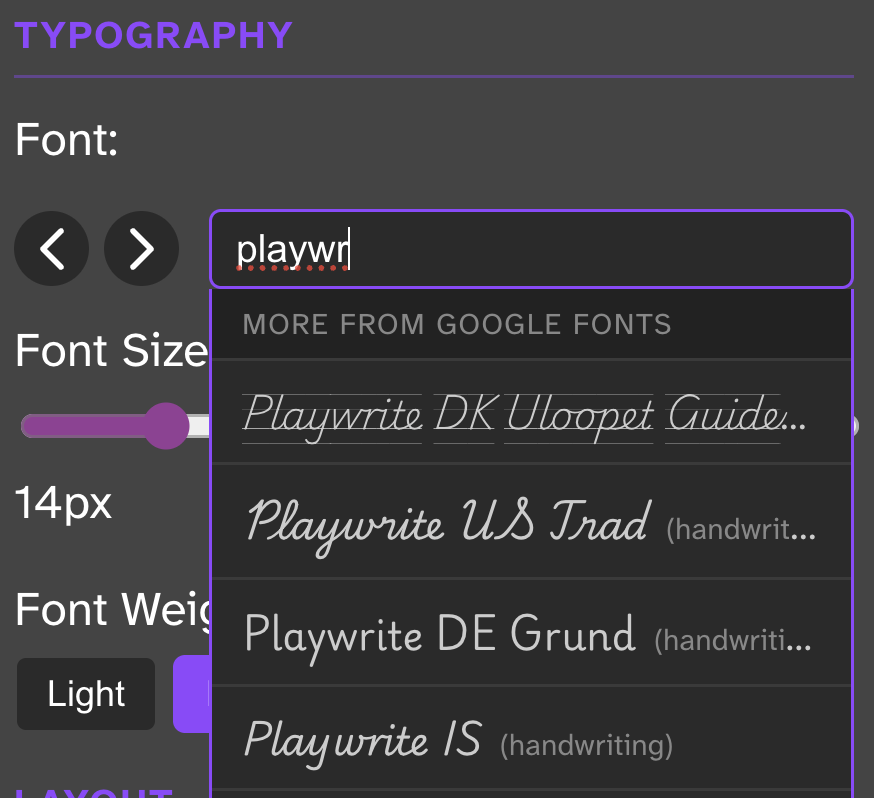
Type what you’re looking for, click to apply, save.
AI Themes Now Pick Better Fonts
The AI theme generator has also been upgraded. It now draws on its knowledge of open-source fonts to pick something that actually fits the prompt — rather than cycling through the same handful of defaults. Ask for a horror theme and you might get Creepster. Medieval fantasy? Probably Cinzel. Cozy coffee shop? Lora. It doesn’t know every font that exists, but it tends to land on something fitting.
To try it, use the AI Theme Generator in the settings panel and enter a game name, vibe, or aesthetic.